Genshin Impact on Xbox: How to Download, Play, and Use Cross-Save in 2024
Genshin Impact on Xbox delivers a seamless, free-to-play adventure with cross-save and stunning 4K/60FPS support on Xbox Series X|S.
If you need the quick answer right away: yes, Genshin Impact is on Xbox in 2026, and it’s fully supported. HoYoverse brought the game to Xbox Series X|S on November 20, 2024, and since then the Xbox version has stayed in step with the other active platforms. You can download it for free, use cross-play and cross-save, and jump in with the same account you use on PC, mobile, or PS5.
This guide focuses on the parts that actually matter if you’re planning to play on Xbox: how to download it, what kind of storage and performance to expect, how account linking works, what perks Xbox players get, and the most common problems people run into.
Is Genshin Impact on Xbox
Yes — Genshin Impact is officially available on Xbox Series X and Xbox Series S. It launched during the Version 5.2 cycle on November 20, 2024, and the Xbox build has continued receiving updates at the same pace as PC, PS5, and mobile. As of the 6.x era in 2026, it’s fully current.
One thing you do need to know: it is not available on Xbox One. That includes the original Xbox One, Xbox One S, and Xbox One X. HoYoverse kept support limited to current-gen Xbox hardware, largely because the game’s newer regions, denser environments, and heavier visual effects push past what last-gen consoles can comfortably handle.
You can find the game through the Microsoft Store under HoYoverse’s publisher page, or just search “Genshin Impact” directly. The store listing is free-to-play, so there’s no purchase barrier just to install it.
Genshin Impact on Xbox Requirements
Before you hit download, make sure you’ve got enough room. In the 2026 build, Genshin Impact takes up around 124.86 GB on Xbox Series X|S, based on the official store listing. Realistically, you should keep at least 130 GB free so patches and major version updates don’t immediately become a problem.
That larger install size makes sense, honestly. The game is carrying years of added content now, including Inazuma, Sumeru, Fontaine, and Natlan, so it’s way bigger than the 2020 launch version.
Performance is solid on both current Xbox models, but there is a difference:
| Requirement / Performance | Xbox Series X | Xbox Series S |
|---|---|---|
| Supported | Yes | Yes |
| Resolution | ~4K (native or upscaled) | ~1080p upscaled |
| Target Frame Rate | 60 FPS | 60 FPS |
| Storage Need | ~130 GB free recommended | ~130 GB free recommended |
| 120 FPS Mode | No | No |
On Series X, you’re looking at a stable 4K/60 FPS experience with sharper image quality and faster load times. On Series S, the game usually targets 60 FPS as well, but at a lower internal resolution, typically upscaled to around 1080p. In more demanding areas — especially dense zones like Natlan or the Temple of Space added in the April 2026 update — Series S can dip a bit, though it still feels smooth overall.
You also need a constant internet connection. Genshin Impact has no offline mode, so even solo play requires you to be online. A broadband connection of around 10 Mbps or better is a good baseline, especially if you plan to do co-op regularly.
To install it, just open the Microsoft Store on your console, search for the game, and start the free download. You don’t need a credit card to claim it, but you do need an Xbox account to access the store.
Genshin Impact Xbox Account Linking
This is the part you really don’t want to mess up.
The first time you launch Genshin Impact on Xbox, the game asks you to link a HoYoverse account. If you already play on another platform, this is where you should sign in with your existing account. Do that before starting the game proper.
If you skip that step, the system can create a new account tied to your Xbox profile instead. That means you’ll end up with a fresh Adventure Rank 1 save and a separate UID, not your existing progress. And that’s where the headache starts, because progression on that newly created account cannot simply be merged into your old PC, PS5, or mobile account later.
Here’s the safe approach:
-
Launch the game on Xbox for the first time.
-
When prompted, sign in with your existing HoYoverse account.
-
Confirm the correct server region.
-
Only then continue into gameplay.
Once the account is linked properly, your characters, Primogems, weapons, quests, and world progression all carry over. Cross-save works smoothly after that.
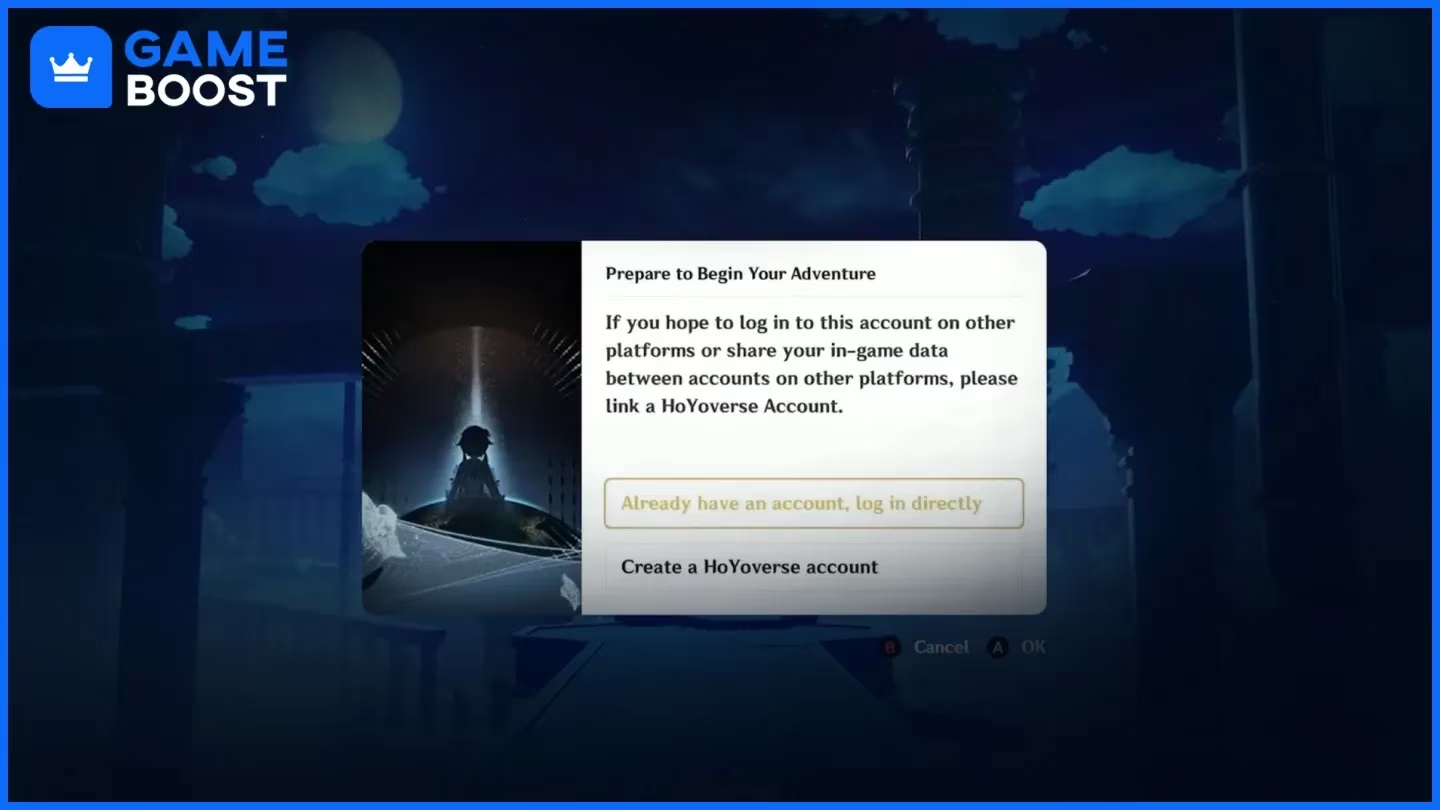
A few important warnings:
-
First-login linking matters most: skipping it can create the wrong account.
-
UIDs are separate: HoYoverse treats each account as its own progression track.
-
Relinking can be limited: in some cases, changing accounts later is heavily restricted.
-
Server choice is permanent: North America, Europe, Asia, or SAR must be chosen carefully.
Server selection is especially important because it affects your ping long-term. Pick the region closest to where you actually live. If you choose a faraway server by mistake, your latency will stay high no matter how good your console or internet setup is.
Genshin Impact on Xbox Features
The Xbox version feels like a proper console release, not some awkward port. Controls are built around the Xbox pad in a way that makes combat, menu navigation, and character swapping feel natural right away. Charged attacks, Elemental Skills, Bursts, and quick team rotations all map cleanly to the controller.
The big feature here is full cross-play. Xbox players can team up with friends on:
-
PC
-
PS5
-
iOS
-
Android
As long as everyone meets the usual co-op requirements, like reaching Adventure Rank 16, you can play together across platforms without any special restrictions.
Cross-save is also fully supported, which is a huge deal if you bounce between devices. You can grind on Xbox at home, then log in on mobile later and keep going with the same account.
Xbox also got a platform-specific cosmetic during launch: the “Wings of Fate’s Course” glider. It was tied to the release promotion and remains one of the few Microsoft-exclusive cosmetics associated with the game.
As for Game Pass, this is where people sometimes get confused. Genshin Impact is not part of the standard Game Pass game library as a premium included title. You do not need Game Pass to download or play it. What Xbox players do get, though, are Game Pass in-game benefits, which can include cosmetic items and consumable rewards for subscribers.
Genshin Impact Xbox Problems
Download or launch issues
The most common install problem is a store region mismatch. If your Microsoft account region doesn’t line up with your console settings or your actual location, the store may throw an error or refuse the download. Usually, the fix is to check your Microsoft account region, match it with the console locale, and try again.
Another issue that pops up after major patches is the update getting stuck at a certain percentage. If that happens, clearing the Xbox store cache is often the fastest fix. If the install is badly corrupted, deleting and reinstalling the game can work too — just make sure your progress is already tied to a proper HoYoverse account first.
Also, don’t overlook storage. With a game this large, being short on free space by even a modest amount can cause update failures or launch problems.
Login and cross-save issues
The worst login problem is accidentally creating the wrong account on first boot. If that happens and you realize you’re on a fresh save instead of your main account, contact HoYoverse support as soon as possible. The earlier you catch it, the better your odds.
You may also run into device authorization checks. HoYoverse tracks authorized devices on each account, and if something looks unusual — too many devices, suspicious login activity, or repeated verification triggers — you may need to confirm access through the HoYoverse Account Center in a browser.
Here are the usual causes behind Xbox login trouble:
-
Signing into the wrong HoYoverse account
-
Skipping the initial link prompt
-
Hitting relink restrictions after a guest account is created
-
Running into device verification or authorization limits
Performance and lag issues
If the game feels laggy on Xbox, the console usually isn’t the real problem. In most cases, it comes down to server selection and network latency. If you’re playing on a server far from your actual region, ping can stay above 200 ms, and that leads to delayed swaps, reaction timing issues, and co-op desync.
It’s also worth setting expectations correctly: Xbox targets 60 FPS, not 120 FPS. So if you’re used to high-refresh PC gameplay, the console version may feel less responsive even when it’s working exactly as intended.
For co-op desync, these fixes help the most:
-
Make sure everyone is on the correct server region
-
Use wired Ethernet instead of Wi-Fi if possible
-
Avoid heavy background downloads on the same network
-
Restart the game after major ping spikes or failed co-op sessions
Genshin Impact on Xbox Alternatives
If Xbox isn’t your setup, there are still plenty of ways to play. As of mid-2026, the active platform list includes:
| Platform | Status in 2026 | Best For |
|---|---|---|
| Xbox Series X | S | Active |
| PC (Windows) | Active | Highest visuals, lowest latency, uncapped FPS |
| PS5 | Active | Premium couch setup, fast loads, DualSense features |
| iOS / Android | Active | Portability and daily play on the go |
| HarmonyOS NEXT | Active | Supported mobile ecosystem |
| PS4 | Ended April 8, 2026 | No longer supported |
The PS4 version has ended support, which happened on April 8, 2026. So if you were still holding out on older Sony hardware, that route is closed now.
For pure performance, PC is still the best option. You get the highest visual ceiling, lower input latency, and uncapped frame rate potential. PS5 is great if you want a polished living-room experience with strong loading performance and DualSense support. Xbox Series X|S is right there with it as a very comfortable console option, especially if you already use Xbox services and want the extra value from Game Pass perks.
Mobile remains the most flexible platform by far. It’s ideal if portability matters more than image quality, though the best settings still demand strong hardware like an Apple A15 or Snapdragon 8 Gen 2 class chip and above.
Cloud play is another option worth mentioning. Through Xbox Cloud Gaming with Game Pass Ultimate, you can stream the game on supported devices without owning a Series console. The trade-off is extra input delay — usually around 40–60 ms more latency — which can make harder content like Spiral Abyss noticeably tougher.
Conclusion
So yes, Genshin Impact is on Xbox, and in 2026 it’s a fully supported, up-to-date way to play — as long as you’re on Xbox Series X or Series S. It’s free to download, supports full cross-play and cross-save, and gives Xbox users a clean controller-first experience with some extra perk support through Game Pass.
If you want the best setup, keep this checklist in mind:
-
Use an Xbox Series X|S
-
Leave at least 130 GB of free storage
-
Link your HoYoverse account on first launch
-
Choose the correct server region
-
Use wired internet if you care about co-op stability
-
Check for available Xbox perks and cosmetic bonuses
Xbox is a great fit for players already in the Microsoft ecosystem, especially if you want a relaxed couch setup without giving up cross-save. If you care most about uncapped FPS, PC still wins. If portability matters most, mobile is hard to beat. But for straightforward console play, Xbox absolutely gets the job done.
Data referenced from TrueAchievements can help Xbox players set expectations for the Series X|S experience by tracking how the community engages with Xbox features like achievements and platform onboarding, which aligns well with the key Xbox-specific priorities in this guide—installing from the Microsoft ecosystem, ensuring enough storage for large updates, and getting the HoYoverse account link correct on first launch to avoid progress being tied to the wrong profile.